Imitation Learning Pipeline
Summary of the software engineering behind building an imitation learning infrastructure for the Pracsys Lab.
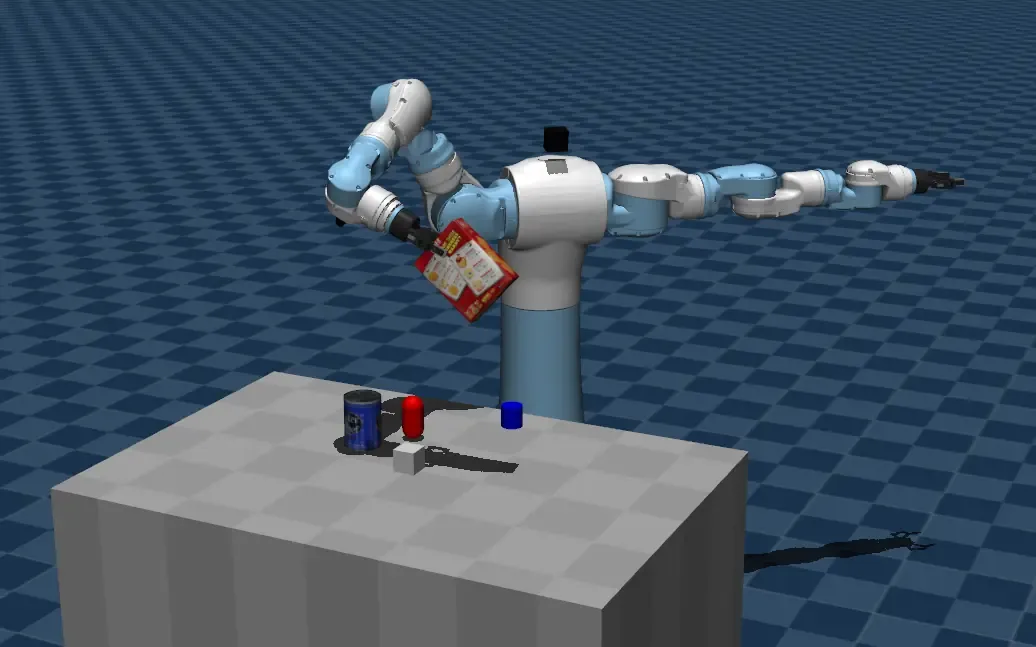
Motoman SDA10F robot picking up a Cheezit box in a MuJoCo simulation.
During my research assistantship at the Pracsys Lab during the summer of 2025, there was growing interest in imitation learning and large-scale VLA models. However, our lab lacked the infrastructure to collect data and deploy these policies on our robots. I volunteered to build this pipeline so we could conduct experiments with the new VLA models.
Goals
Our existing robot software stack is built around our Motoman SDA10F robot and is designed for open-loop control. However, it was placed in a Catkin workspace with several unused packages, files, and scripts — making it difficult to understand. It also ran on Ubuntu 20.04 and ROS Noetic — both older software versions. We also had access to another lab's UR5e robot, but it had never been used before.
Our goals for the new infrastructure were as follows:
- Clarity
- The ROS workspace should have a minimal set of packages and code. Additional unused packages add mental load to learning how the project works.
- Code should be self-documenting or contain comments to explain specific implementation quirks.
- Flexibility
- Standard APIs should be used whenever possible to avoid locking code into a specific robot, software library, or implementation.
- Reuse
- The workspace should run on the same Ubuntu and ROS versions as the old code to reuse existing packages whenever possible.
- Since the SDA10F teleoperation code depends on now-deprecated libraries, I wanted to avoid upgrading ROS because that would entail re-implementing these libraries. Reusing existing code that is proven to work would therefore minimize the amount of time taken to implement a feature.
- The workspace should run on the same Ubuntu and ROS versions as the old code to reuse existing packages whenever possible.
ROS Design
With these goals in mind, I designed and implemented the following ROS node infrastructure:
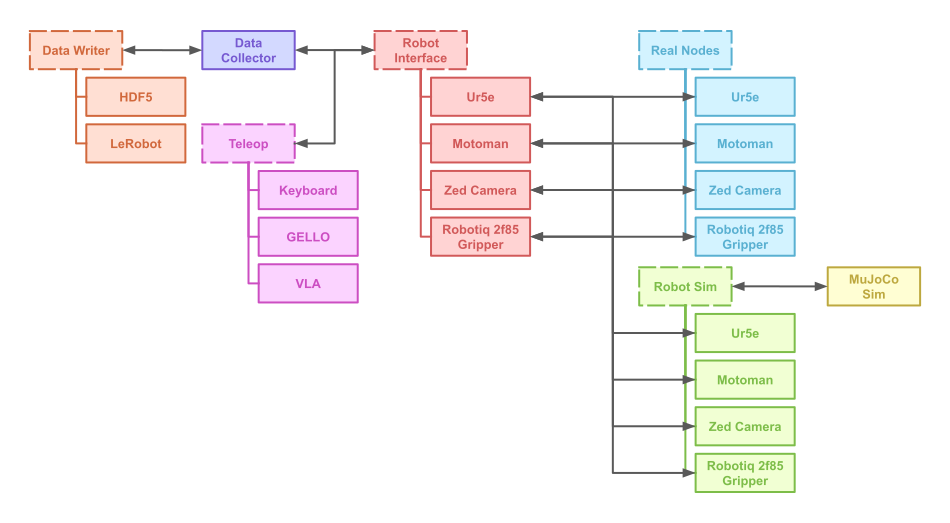
ROS node architecture. Dotted boxes represent a common interface/API.
Real Nodes
Every piece of hardware in ROS — from ZED Mini cameras to the SDA10F — comes with its own ROS node that handles the low-level driver communication required to fetch images from a camera or control a joint on a robot. The "API" of a ROS node can be seen as the topics and services that it publishes. These Real Nodes aren't standardized and expose a variety of different APIs.
Robot Interface
While we could modify the source code of the real nodes to standardize their API, that would make the library codebase more fragile to upstream changes from the original authors. Therefore, Robot Interface Nodes were created to convert their non-standard ROS node APIs to a standard API.
- All robots
- Published their current joint states to a
/ROBOT_NAME/joint_statestopic - Listened to
/teleop/joint_statesto control their joint positions
- Published their current joint states to a
- All cameras published their RGB and depth images to
/CAMERA_NAME/rgband/CAMERA_NAME/depthtopics
Robot Sim
To support collecting data and deploying policies in simulation, I used the open-source MuJoCo physics engine. Since we had existing code and digital models built for the SDA10F in MuJoCo, this was the easiest simulator to use.
I created a MuJoCo Sim Node that simulates a scene and exposes a ROS API for interacting with it. It publishes topics for joint states and camera images while listening to topics for joint control.
Then, simulated versions of the hardware nodes were created that exposed the same API as their underlying hardware but used the MuJoCo Sim under the hood. By replicating the existing hardware API, I could test Robot Interface nodes in simulation prior to deploying them on the real robot.
Teleoperation
To publish the joint commands for the robot, I built Teleop Nodes. These nodes publish to /teleop/joint_states, which is the same topic that Robot Interface Nodes consume. Teleop nodes can represent human input (keyboard, GELLO, etc.) or a deployed policy running inference (, etc).
Teleoperation on a real Ur5e robot using a 3D-printed GELLO controller.
Teleoperation on a simulated Motoman SDA10F robot using a keyboard + mouse.
Data Collection
Finally, a Data Collector Node collects all the information — robot joint states, camera images, and teleop joint commands — and sends it to a Data Writer process, which writes the data to disk in a specific format (LeRobot, HDF5, etc.). Each run or "episode" is a single action, such as stacking a pile of cubes or closing a drawer.
Data collection in simulation using a GELLO arm.
To better visualize our data, I wrote a script that can load an episode into rerun.io. These replays can help us diagnose what happened during a run — especially when we're collecting data from several experiments in simulation.
Reviewing collected data inside rerun.
Additional Bits
Aside from the core ROS architecture, these are the most important miscellaneous scripts I wrote for the project.
Robot Config
The robot_config.py script holds a dictionary of different robot configurations. Each robot configuration includes joint, MuJoCo, gripper, and camera information.
Each ROS node that needs robot-specific information can then load a configuration from a name passed into its CLI.
run_ros.py
This script reads a .yaml ROS config file that specifies a list of commands to run, and then executes the commands in a single tmux session with different tmux windows. The .yaml config file can also define variables that are substituted into the commands for more dynamic behaviors.
ws_install.sh
This script installs the entire workspace onto a new Ubuntu 20.04 computer. It automatically installs required dependencies if they aren't present.
hotreload.py
This script opens a MuJoCo scene XML file in a MuJoCo viewer and hot-reloads the viewer whenever the scene XML is changed.
Editing a scene with hotreload.py.
Lessons
After finishing this project, I had the following takeaways:
- Understand Your Hardware — Document Everything!
- There will inevitably come a time when the robot throws an error on its pendant and it's up to you to trace down a fix. Especially for older/niche robots (like the Motoman SDA10F), online discourse and troubleshooting resources are limited.
- After encountering several unique errors on the Motoman that took days to troubleshoot, I created a
motoman/documentationfolder in the repository that stores manuals for the Motoman SDA10F robot, the FS100 controller, the Robotiq 2F-85 gripper, and the Robotiq universal controller. Additionally, I wrote aREADME.mdfile that documents the basic operation of the robot, manual control through the pendant, robot joint calibration, and steps for resolving specific errors that may occur on the pendant. By documenting your hardware, the next grad student who inherits the robot will have an easier time working with it.
- Quality of Life Matters
- Small scripts can make a big difference in maintaining a cleaner workspace and working with our physics simulator.
- Keeping our
ws_install.shscript updated not only makes it easy to rebuild the repository if something breaks, but also makes it easy to onboard new undergraduates onto the repository. - The
hotreload.pyscript brought a "web-dev-like" experience of live editing to MuJoCo, making it faster to build scenes by hand. - The
run_ros.pyscript created a standard way to define ROS node networks, allowing us to build different configs for simulation and real environments.
- Simplify, Simplify
- While ROS nodes serve as a useful framework for splitting code, too many nodes can slow down performance and hog CPU time due to the overhead of forwarding messages and running multiple processes.
- My choice to replicate an existing hardware API in sim — while making it easier to test the interface classes — added additional complexity and computational overhead. A simpler architecture would have the simulation nodes follow the standard
Robot InterfaceAPI directly.
Closing
This project was my first shot at building a ROS infrastructure from scratch. Coming in with no background in robotics, I quickly learned new software like ROS, RViz, and MuJoCo, and gained experience in designing modular ROS nodes. I'm looking forward to applying these skills to my next project.